
Why We Use Autodesk Flame — Not After Effects — A Technical Perspective
In the world of high-end commercial post-production, one tool continues to sit at the centre of the finishing suite: Autodesk Flame. While Adobe After Effects is an extraordinarily capable application — and the industry standard for motion graphics — it was never designed to be the last pair of hands on a broadcast commercial. Flame was. Understanding why requires looking beyond feature lists and into the fundamentally different philosophies behind each tool.
The Finishing Mindset vs. the Motion Graphics Mindset
After Effects is a layer-based compositing and motion graphics application. It excels at building visual compositions from scratch — animated titles, kinetic typography, broadcast packages, and stylised sequences where the artist is creating imagery rather than refining it. It is a creative origination tool.
Flame occupies a different position in the pipeline entirely. It is a finishing and visual effects system that combines 3D compositing, editorial conform, colour grading, and final delivery into a single integrated environment. Where After Effects asks "what can we build?", Flame asks "how do we get this to air — flawlessly, on time, and in fifty different deliverable formats?"
That distinction matters enormously when the stakes are high, the client is in the room, and the spot needs to be broadcast-ready by morning.
Real-Time, Client-Attended Sessions
This is perhaps the single biggest differentiator, and the one that is hardest to replicate in any other tool.
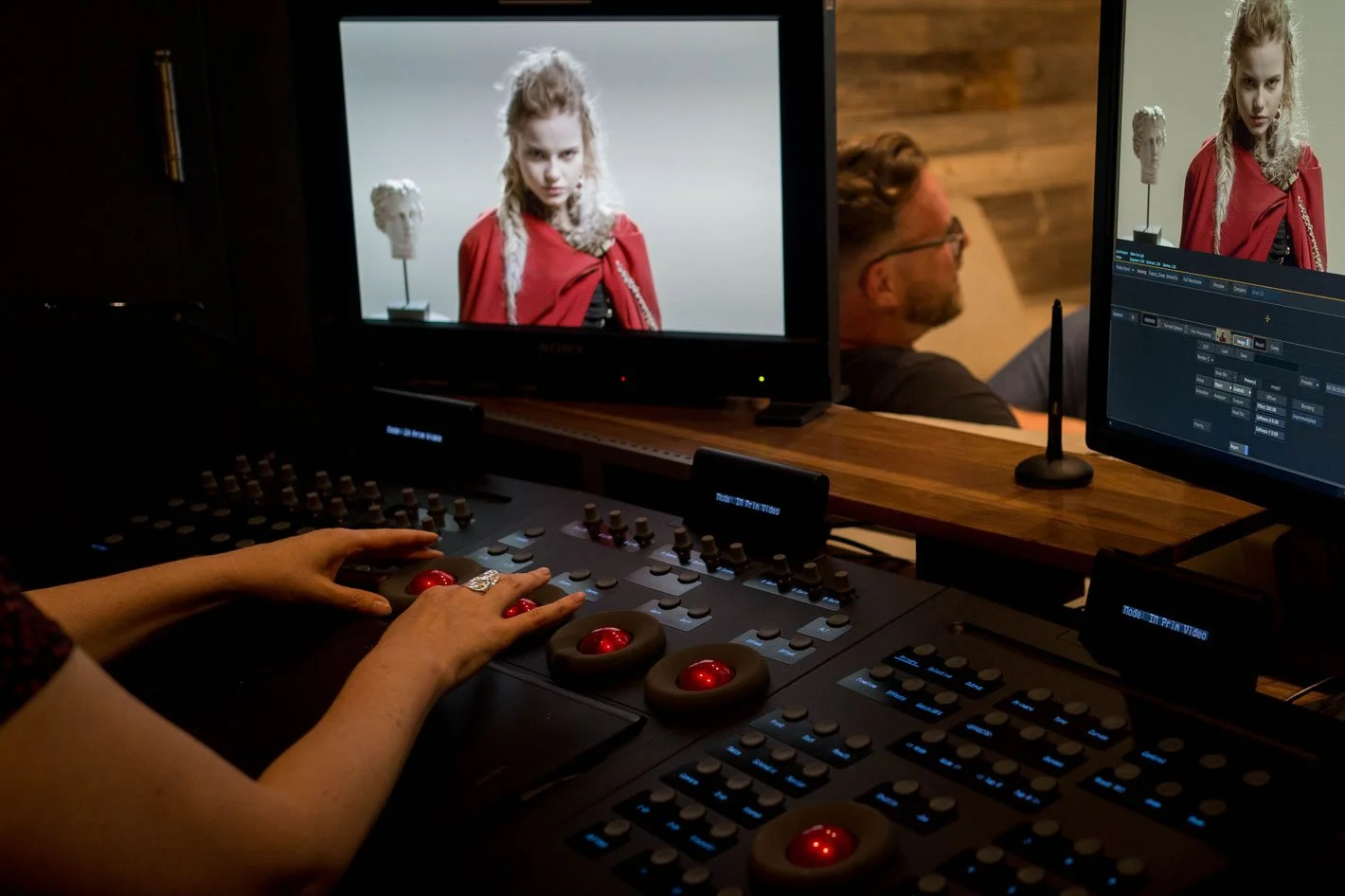
Commercial Flame sessions are client-supervised. The brand's marketing team, the agency's creative directors, and often the account managers are physically present in the suite while finishing takes place. The Flame artist is expected to translate abstract creative feedback — "can you make the skin look more luminous?" or "the product colour doesn't feel right on camera" — into precise technical adjustments, in real time, without visible hesitation.
Flame renders interactively. An artist can composite, colour-correct, retouch, and reshape a shot while the client watches the result update on a calibrated broadcast monitor. There is no "let me render that and show you in five minutes." The conversation between artist and client is continuous, immediate, and creative.
After Effects, by contrast, has no real-time playback engine for complex compositions. RAM previews and disk caching help, but they do not approach the kind of instant, full-resolution feedback that a Flame suite provides. For a client paying thousands of dollars per hour for a finishing session, waiting for renders is not an option.
One Environment, No Round-Tripping
A typical high-end commercial involves editorial conform, VFX compositing, beauty retouching, colour correction, graphics insertion, format conversioning, and multi-version delivery. In an After Effects-based workflow, each of those tasks might require a different application — Premiere for the edit, After Effects for VFX, DaVinci Resolve for colour, a separate tool for delivery and QC. Every handoff between applications introduces the risk of errors, version mismatches, and lost time.
Flame handles all of these disciplines in a single environment. An artist can conform the offline edit, composite CG elements into live-action footage, grade individual shots, retouch skin and product, animate graphics, and render out dozens of delivery versions — all without leaving the application. The timeline, the node-based compositor (Batch), and the 3D compositing environment (Action) are all interconnected. A change in the grade propagates through the VFX. A re-edit from the agency can be reconformed without rebuilding effects from scratch.
This unified pipeline is not a convenience — it is an architectural necessity when a 30-second spot may require 40+ VFX shots, 15 deliverable versions, and a broadcast air date within 72 hours of final client approval.
Node-Based Compositing with True 3D
After Effects uses a layer-based paradigm. Layers stack on top of one another, and while pre-compositions allow some organisational depth, the fundamental model becomes unwieldy on complex shots with dozens of elements, multiple passes, and intricate keying requirements.
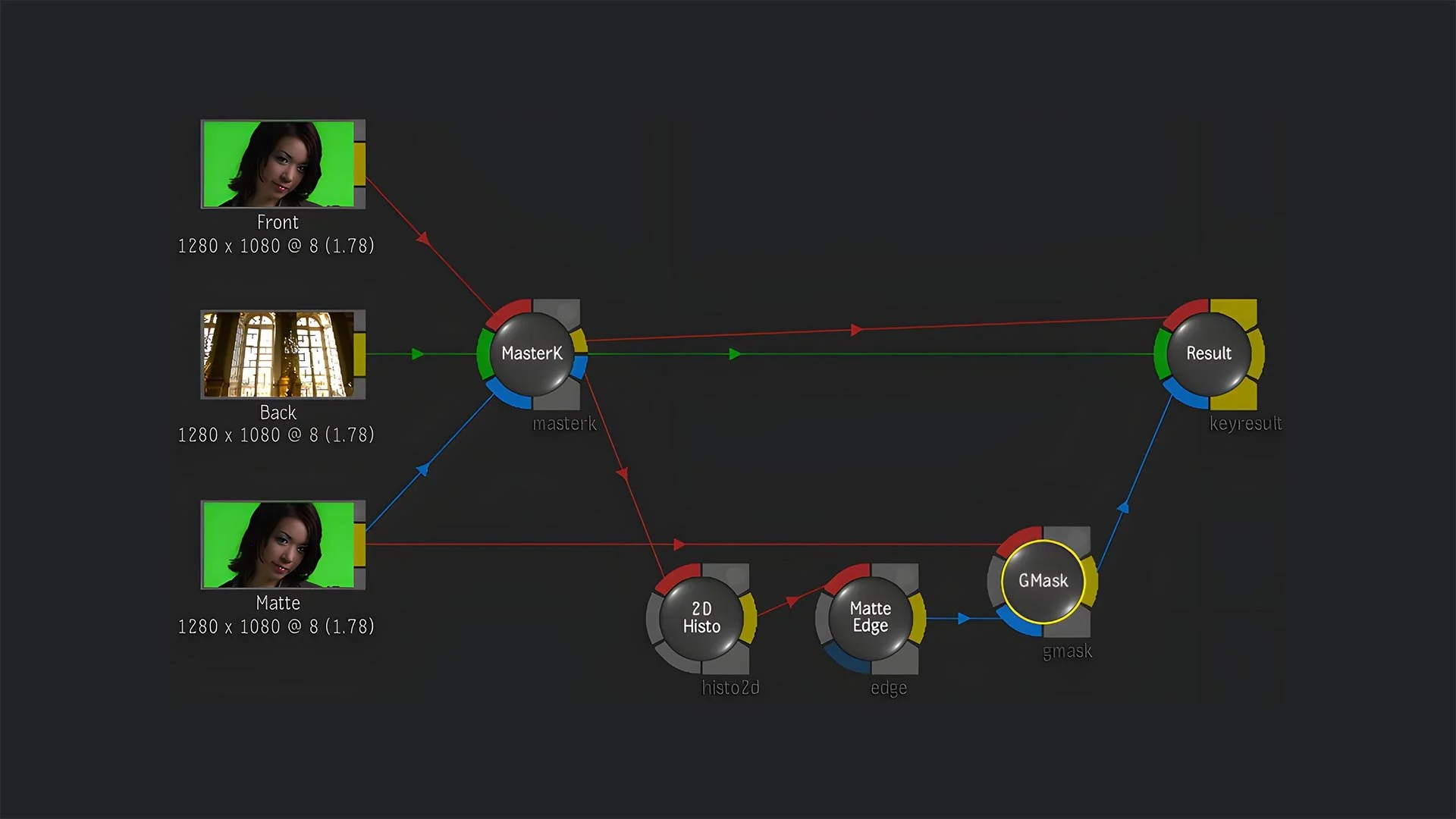
Flame's Batch environment is a fully node-based compositor, giving artists a procedural, non-destructive graph of operations that can be rearranged, branched, and versioned with far greater flexibility. More critically, Flame's Action module combines traditional 2D compositing speed with genuine 3D scene construction — artists can place elements in 3D space, light them, add shadows and reflections, and camera-track objects into live-action plates, all within the same compositing session.
This is not the same as After Effects' 3D layer system or its ray-traced renderer. Action provides a fully integrated 3D compositing environment purpose-built for photorealistic shot finishing, not motion graphics design.
AI-Powered Tools Built for Finishing
Recent versions of Flame have introduced machine-learning tools specifically designed for finishing workflows. Semantic keyers can automatically isolate human bodies, heads, faces, skies, and prominent objects in a shot — dramatically accelerating rotoscoping work that previously consumed hours of manual effort. The AutoMatte AI model automates matte creation for primary subjects. ML-based video upscaling operates at 2×, 3×, and 4× resolution for archive restoration and format conversion. Depth map generation from 2D footage enables sophisticated compositing decisions without dedicated 3D renders.
These are not general-purpose creative AI features. They are precision tools designed to solve specific, recurring problems in high-end finishing — the kind of problems a Flame artist encounters every single day.
Colour Management at a Professional Level
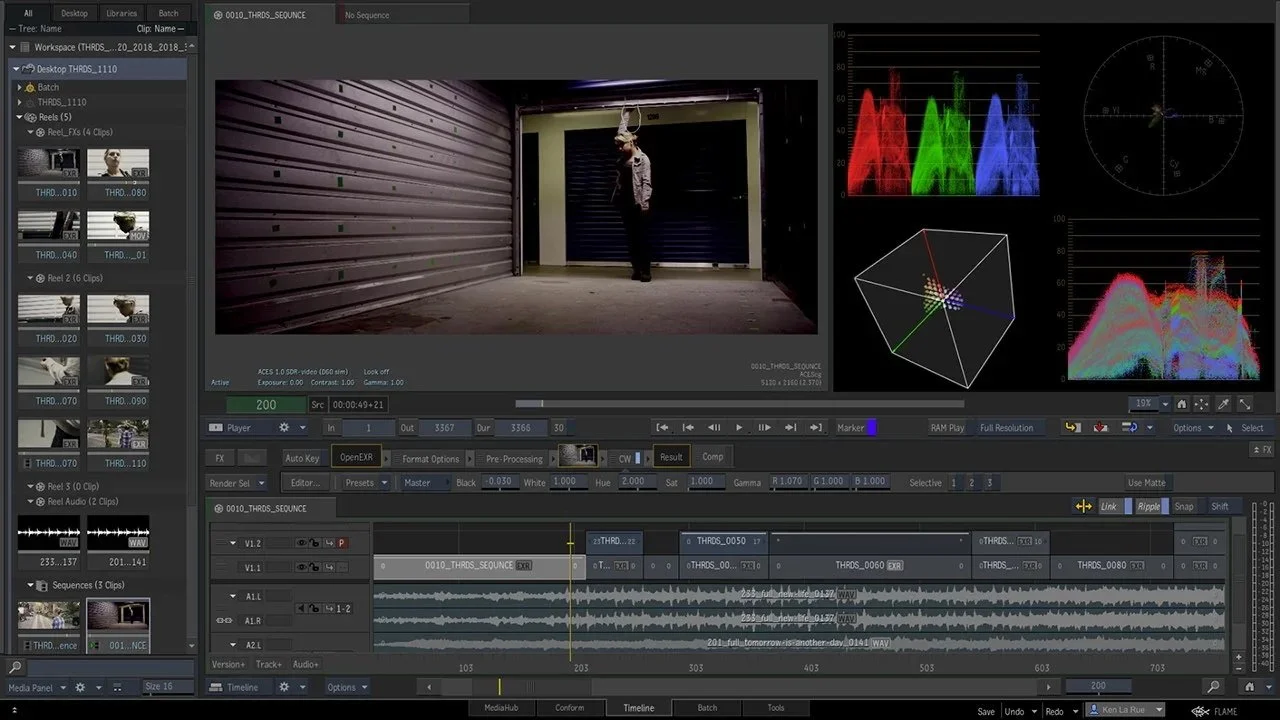
Colour accuracy is non-negotiable in commercial work, particularly for automotive, pharmaceutical, cosmetics, and food brands where product colour must be exact. Flame's colour pipeline supports ACES, OpenColorIO v2, and per-clip colour space tracking, ensuring that what the artist sees on screen remains faithful to the director's vision from ingest through final delivery.
Flame artists routinely manage colour space transforms between camera log formats — ARRI LogC, Sony S-Log3, RED Log3G10 — and delivery colour spaces, including HDR10, Dolby Vision, and HLG for streaming and broadcast. The colour tools are GPU-accelerated and operate directly on the finishing timeline, meaning corrections happen in context, not in a separate application with a round-trip render.
After Effects can work in linear colour spaces and supports some colour management, but it was not engineered for the kind of rigorous, pipeline-wide colour consistency that broadcast finishing demands.
The Versioning Reality
A decade ago, a Flame artist might deliver three to five versions of a commercial. Today, that number can exceed fifty. Different durations (60s, 30s, 15s, 6s), different aspect ratios (16:9, 9:16, 4:3, 1:1), different languages, different legal disclaimers, different product shots for different markets — the combinatorial explosion of modern commercial delivery is staggering.
Flame's timeline, with its sequence reels, batch groups, iteration management, and token-based dynamic rendering, is designed precisely for this kind of high-volume versioning. An artist can structure a project so that a re-edit or a colour change cascades through all versions simultaneously, rather than requiring manual updates to each one.
After Effects has no comparable project management architecture for this scale of versioning. Accomplishing the same task would require elaborate scripting, duplicated compositions, and significant manual oversight.
Autodesk Ecosystem Integration
Flame integrates natively with the broader Autodesk ecosystem — Maya, 3ds Max, and the wider VFX pipeline — enabling seamless exchange of 3D scene data, camera tracks, and render passes. For commercials involving heavy CG work, this integration eliminates translation errors and speeds up the round-trip between 3D artists and the finishing suite.
The software also supports OpenFX plug-ins, Matchbox GLSL shaders, and connections to third-party tools like Boris FX Sapphire and Mocha Pro, extending its capabilities without leaving the core environment.
But What About DaVinci Resolve?
If there is one tool that genuinely challenges Flame's position in the modern post-production landscape, it is Blackmagic Design's DaVinci Resolve. And the question deserves a serious answer, because Resolve is no toy — it is an industry-leading colour grading platform with editing, audio mixing, and node-based compositing (via the Fusion page) built into a single application. It can be had for free, or for a one-time purchase of around $295 for the Studio version. On paper, it sounds like it should have made Flame obsolete years ago.
It hasn't. Here is why.
Colour Grading: Resolve Wins — But That Is Not the Whole Job
Let us state the obvious: DaVinci Resolve is the dominant colour grading platform in the industry, and has been for years. Its colour science, control surface integration, and grading toolset are best-in-class. Many high-end facilities run Resolve for the primary colour grade and Flame for finishing and VFX — the two tools working in tandem rather than competition.
But a commercial is not just a colour grade. It is a conform, a VFX pipeline, a retouching session, a graphics integration pass, a multi-format versioning exercise, and a delivery operation — often all happening in the same session, with the client watching. Resolve's strength is deep but narrow: it is built around the colour page, with editing, Fusion compositing, and audio added as complementary modules. Flame's strength is broad and integrated: every discipline operates on the same timeline, in the same environment, with the same media.
The Fusion Page: Capable, But Not Flame's Batch
Resolve's Fusion page is a genuine node-based compositor with a 3D workspace, tracking, keying, and particle tools. It descends from the standalone Fusion application, which has a decades-long history in film VFX. For isolated shots — a green screen key, a sky replacement, a title animation — Fusion is more than capable.
However, Fusion within Resolve operates on a per-clip basis. Each clip gets its own composition, and the Fusion page does not have native awareness of the broader timeline context in the way that Flame's Batch and Batch FX environments do. In Flame, the compositor and the timeline are fundamentally interconnected — effects propagate through editorial changes, batch groups manage shot iterations, and the entire project structure supports non-destructive versioning at scale.
There are also practical performance considerations. Fusion embedded within Resolve is widely reported to run slower than standalone Fusion, constrained by Resolve's architecture. Complex composites with heavy particle work or multi-layered 3D scenes can hit performance ceilings that do not exist in a dedicated Flame environment running on optimised hardware.
Real-Time Interactivity Under Client Pressure
This is the same argument that separates Flame from After Effects, and it applies equally to Resolve. Flame's real-time compositing and effects processing is designed for live, client-attended sessions where feedback must be actioned instantly on a calibrated broadcast monitor. Resolve can play back graded footage in real time — that is its core strength — but complex Fusion compositions require rendering before full-resolution playback.
In a finishing session where the agency creative director says "can we try the product slightly bigger, move it left, and add a subtle reflection?" the Flame artist adjusts, and the client sees the result immediately. In Resolve's Fusion page, that same request may involve a render pass before the result can be evaluated at full quality. When the session is billed by the hour and the air date is tomorrow, that difference matters.
Conform and Versioning at Scale
Flame's conform workflow is purpose-built for the reality of commercial post-production: ingesting AAFs or XMLs from Avid or Premiere, relinking to high-resolution camera originals, managing mixed frame rates and colour spaces, and then cascading editorial changes through VFX and finishing without rebuilding work. Resolve handles conforms well for colour grading workflows, but its project architecture was not designed for the kind of industrial-scale versioning that commercial finishing demands — fifty or more deliverable versions across multiple formats, aspect ratios, languages, and legal requirements, all managed from a single project structure.
Many facilities actually use Resolve as an intermediary step, "washing" editorial XMLs through Resolve to clean up metadata and colour space issues before reconforming in Flame for the final finish. The two tools complement each other precisely because they excel at different parts of the pipeline.
Where Resolve Makes Sense
Resolve is an outstanding choice for projects where colour grading is the primary finishing task, where VFX requirements are light, and where budgets do not support a dedicated Flame suite and operator. For corporate video, lower-budget commercials, social content, and independent film, Resolve's combination of editing, grading, compositing, and audio in a single free or low-cost application is genuinely revolutionary.
But for high-end broadcast commercials — where the finishing artist needs to composite, grade, retouch, conform, animate graphics, and deliver dozens of versions in a single client-supervised session — Flame remains the tool engineered for exactly that job.
So Why Not Just Use After Effects?
To be clear: After Effects is an exceptional tool. For motion graphics, broadcast design, animated content, and a huge range of creative visual work, it remains unmatched in its combination of power, flexibility, plugin ecosystem, and accessibility. At roughly $60 per month through Adobe Creative Cloud, it is also vastly more affordable than Flame's approximately $5,215 annual subscription — before factoring in the high-performance Linux or macOS workstation required to run Flame effectively.
But affordability and accessibility are not the criteria that govern high-end commercial finishing. The criteria are real-time client interaction, unified conform-to-delivery pipelines, broadcast-grade colour management, industrial versioning capacity, and the ability to handle everything from beauty retouching to 3D compositing to final QC in a single session.
On every one of those criteria, Flame is purpose-built for the job. After Effects is not — because it was never intended to be.
The Simple Version — For Everyone Else
If you have read this far and your eyes have glazed over a little, here is the whole argument in plain English.
Think of making a TV commercial like building a house. After Effects is the interior designer — brilliant at making things look beautiful, creative, and eye-catching. DaVinci Resolve is the painter — nobody matches colour better. But Flame is the general contractor. It is the one person on site who can do the plumbing, the electrical, the carpentry, the painting, and the final inspection, all while the homeowner stands in the room pointing at things and saying "actually, can we change that?"
After Effects cannot show the client changes in real time — it has to stop and think first. Resolve is world-class at colour but was not built to juggle dozens of visual effects, retouching, graphics, and fifty different delivery formats in a single session. Flame does all of it, live, in one place, while the client watches.
That is why high-end commercial post houses pay a premium for Flame. It is not about one feature being better than another. It is about having one tool that can handle the entire final stage of a commercial — from the moment the edit arrives to the moment the finished spot goes to air — without ever leaving the room or opening another application. When the budget is big, the deadline is tight, and the brand's marketing team is sitting on the couch behind you, that is the tool you want.
The Bottom Line
Choosing Flame over After Effects or DaVinci Resolve for high-end commercials is not a statement about which software is "better." Each tool is exceptional at what it was designed to do — After Effects for motion graphics, Resolve for colour grading, and Flame for finishing. The distinction is that commercial finishing is a specific discipline with specific demands: real-time client interaction, unified multi-discipline workflows, broadcast-grade delivery at scale, and the ability to handle everything from beauty retouching to 3D compositing to final QC in a single session.
After Effects is where ideas come to life. Resolve is where the grade happens. Flame is where commercials get finished — on time, on spec, on air. In our world, that distinction is everything.